TOPIC: Blue Design II

Blue Design II 8 years 6 months ago #4621

Who can help me solving this problem?

Thank you very much!

Kind regards,
Melanie
The administrator has disabled public write access.

Blue Design II 8 years 6 months ago #4629

  • Front2000
  • Front2000's Avatar
  • OFFLINE
  • New Member
  • Posts: 2
  • Orders: 0
  • Download: 0
  • Karma: 0
:(
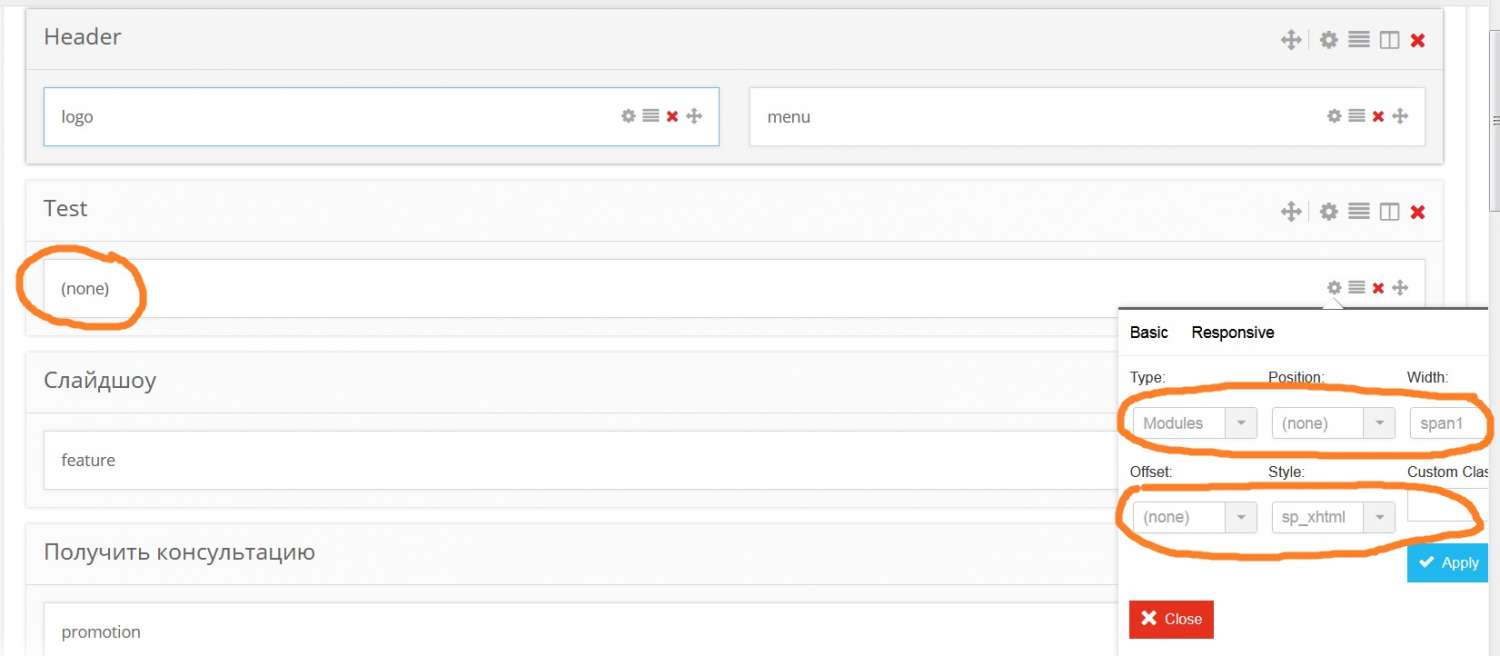
In your docs joomla.vinagecko.com/docs/?template=blue_design seeing, how can to add a new row of module positions,
Picture:
joomla.vinagecko.net/d/t/blue_design/assets/images/step-4.png

I can't change the position, name, and any settings because it's grayed out. (see attachment) What's wrong?
Attachments:
The administrator has disabled public write access.

Blue Design II 8 years 6 months ago #4634

  • Front2000
  • Front2000's Avatar
  • OFFLINE
  • New Member
  • Posts: 2
  • Orders: 0
  • Download: 0
  • Karma: 0
O, looks like i solved my problem - update helix2.
Download and install it there:
www.joomshaper.com/downloads/template/helix-ii
(Helix - II Template only)
The administrator has disabled public write access.
Leather Purses & Handbags, Women’s Crossbody Bags, Tote Bags for Women, Leather Backpacks, Men’s Wallets & Card Cases, Official OLEVS Website, OLEVS Couple Watches, OLEVS Women's Watches, OLEVS Men's Watches, OLEVS Watch, OLEVS Watches